Automated Demo Videos - The Hard Part
Dave Weiss · September 20, 2026 · 2 min read
I wrote previously about how much I dislike making demo videos for our applications.
As it turns out making a standard out-of-the-box video against all the application meta data and back and front end tests turns out to be the easy part. But what if you don't like what was produced by default and you'd like to make changes and edits? And how do you know an application has been changed in a way that materially effects all that generated meta data and tests? We're making updates and adding features or tweaking the user experience for the Suite Resources AI Application Manager Platform all the time, so we have to know when changes are made.
We are doing the same to the applications generated by the platform, too.
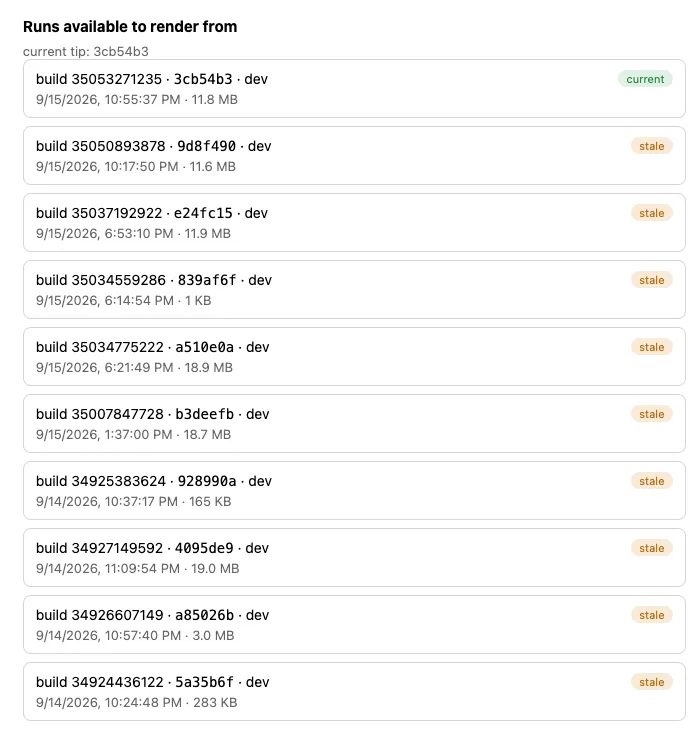
We need to know when there is "drift" in an application so we can determine if we want to make changes to the video. At build time for an application creation or change, we gather up all that meta data into a catalog of possible actions the application can perform. If the catalog is different than the previous version, we know "drift" exists and we can message the Video Director users that a new catalog is available. They can determine if they want to make a new video with edits or leave the existing one in place.
As an example, the following video is an out of the box video of Badge Scanner, our convention/conference badge scanning application.
If you look closely at the video, there is a significant issue of having 2 Notes fields on the Contact detail page. We just updated the Badge Scanner app to remove the extra Notes field. By removing the field, the catalog of actions will be different than the previous catalog, creating "drift". I don't want to give too much away about Video Manager yet, but here's a screen shot of drift of Badge Scanner over the past day or so: